Release flow and design
tagpr treats release preparation as a pull request. Merging that pull request approves the release contents, and the resulting tag starts the release flow.
Why a release pull request?
Software releases often require small but important changes that are easy to miss:
- choosing the next version;
- updating version files;
- preparing a changelog or release notes;
- updating dependencies or generated files;
- running project-specific preparation commands;
- tagging the correct commit.
When these steps are performed manually on one maintainer’s machine, the process can become implicit and difficult to review. tagpr moves preparation into a pull request so the proposed release is visible to maintainers and contributors before it happens.
The pull request is both automation output and an escape hatch. tagpr prepares the routine changes, while maintainers can commit any exceptional release work to the same release PR branch.
Design principles
- Automate the proposal, not the decision. tagpr prepares a candidate version, changelog, and file changes. Maintainers can review and adjust them before merging.
- Use the normal pull request workflow. Release knowledge should not live only in a maintainer’s local commands. The same review and approval flow used for development also applies to release preparation.
- Make the tag the start of the release flow. Merging approves the release commit; tagging identifies the exact source and version to release. Build, packaging, publishing, and deployment can then consume that tag without becoming part of tagpr itself.
- Reuse GitHub as the source of release information. tagpr builds on merged pull requests, labels, generated release notes, GitHub Actions, and GitHub Releases instead of introducing a separate release database or workflow.
This keeps the release process visible before the release happens: maintainers and users can see both the proposed contents and version in the open release pull request.
Lifecycle
The release branch is the long-lived branch configured by tagpr.releaseBranch. It
is the base of the release pull request and receives the release commit. The release
PR branch is the temporary tagpr-from-* branch that tagpr manages as the pull
request head.
The following examples use main as the release branch.
1. Advancing main creates a release pull request
When main advances beyond the latest release tag, tagpr automatically creates a
release PR branch and a release pull request. By default, the pull request:
- proposes the next version;
- updates configured version files;
- updates the changelog from GitHub’s generated release notes; and
- creates a release-note configuration when the repository has none.
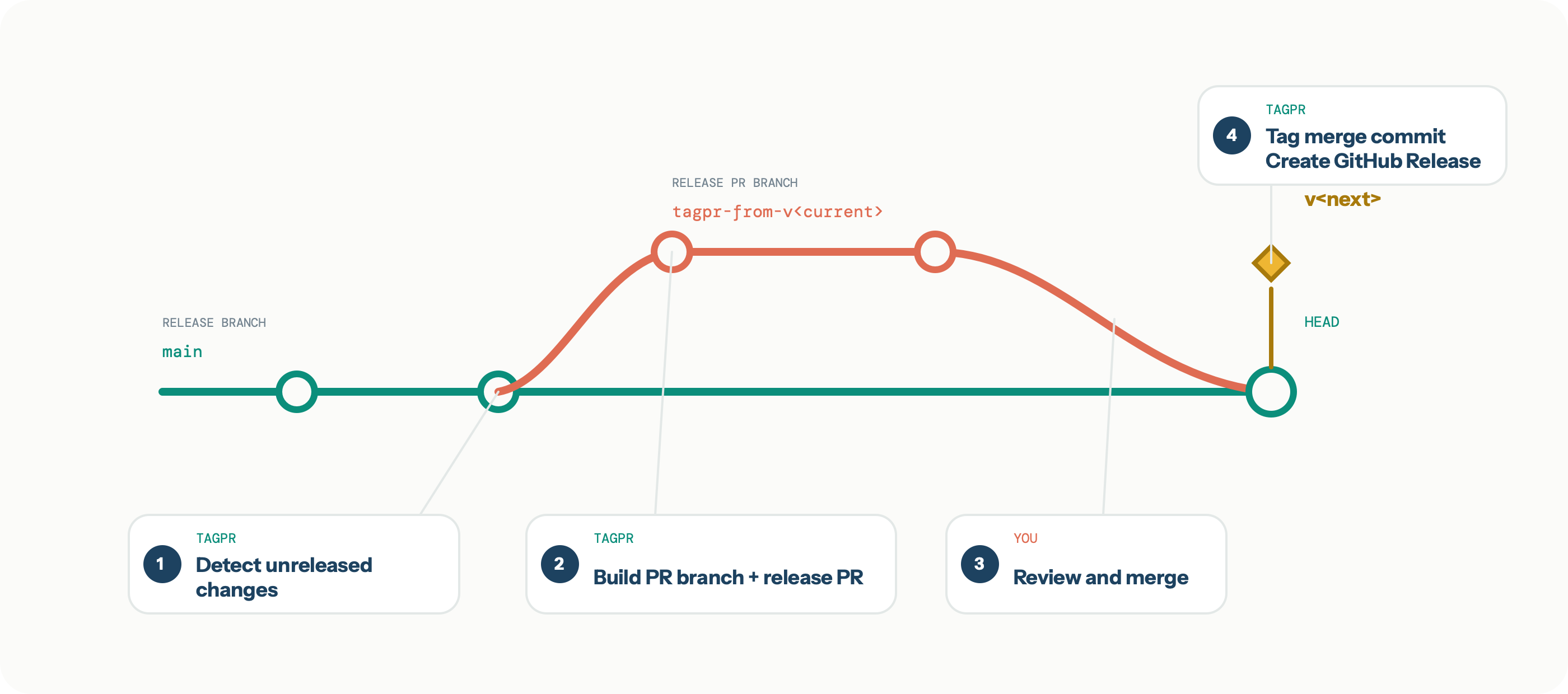
The green line is the release branch, main, and the coral line is the release PR
branch. The numbered callouts distinguish tagpr’s automated work from the maintainer’s
review and merge decision. Because tagpr refreshes the release PR branch from the latest
main, the branch point and the merge result are adjacent on main in the graph. The
merge result is the new head; tagpr runs again, attaches the version tag to that commit,
and can also create a GitHub Release.
The graph is conceptual; tagpr supports all the GitHub merge methods, that is, Create a merge commit, Squash and merge, and Rebase and merge.
2. An open release pull request follows main
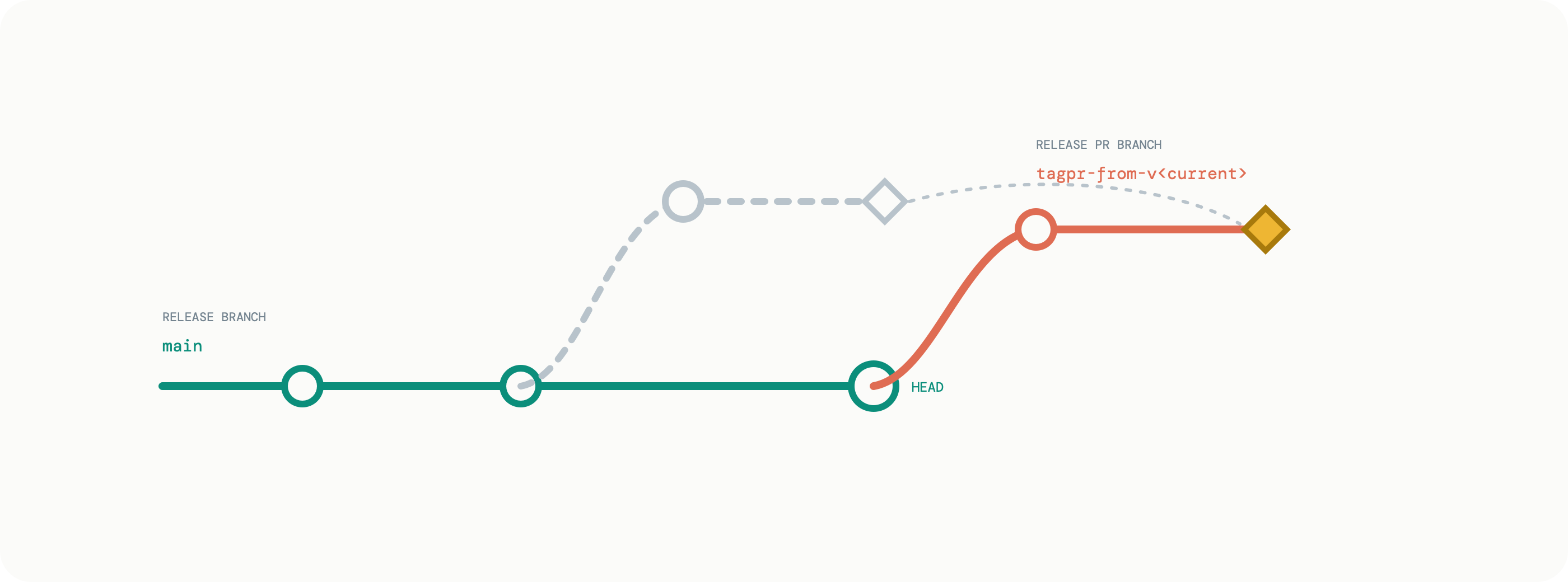
If the release pull request remains open and main advances again, tagpr automatically
updates the pull request. It recreates the release PR branch from the latest main and
reapplies the release changes, producing a rebase-like result without requiring the
maintainer to rebase it manually.
In the diagram, the faded path is the previous branch state and the solid coral path is the updated state.
3. Maintainers can adjust the release pull request
The release pull request is not read-only automation output. Maintainers can commit directly to its release PR branch to perform work required before release, such as:
- selecting an exact version;
- editing release notes;
- updating dependencies or generated files; and
- changing other project-specific metadata.
Repeatable file changes can be automated with tagpr.command, which runs before version
files are updated, or tagpr.postVersionCommand, which runs afterward.
See Release preparation commands
for execution details.
When tagpr updates the pull request after main advances, it tries to preserve these
additional commits by carrying them forward onto the recreated release PR branch. The
diamond in the update diagram represents a manual commit preserved in this way.
After reviewing the automatically generated and manually adjusted changes, merge the pull request to approve them and start the release.
4. Merge when you want to start the release
The release pull request does not impose a release schedule. You do not need to merge it immediately, and leaving it open is expected. It remains a continuously updated view of the next release until a maintainer decides to start the release flow.
This means the repository normally has one open release pull request whenever unreleased changes exist. Treat that pull request as a visible release queue rather than unfinished work that must be closed quickly.
If a continuously open pull request does not suit the project, another good option is to merge it frequently and make smaller releases. Small, incremental releases reduce the amount of change reviewed and shipped at once and make the release queue short-lived.
After the merge, tagpr tags the resulting commit. That tag starts the project-specific release flow. tagpr can also create a GitHub Release.
Downstream build, packaging, publishing, and deployment steps can use the action’s
tag output or a separate tag-triggered workflow. See
Tagging and release
.
Version files and tags
A version file serves two purposes:
- tagpr writes the proposal into it while preparing the release pull request;
- tagpr reads it after merge to determine the final tag.
This makes a version edit in the pull request authoritative. Projects without a version
file can set tagpr.versionFile = - and use tags as the only version source.
Changelog and GitHub Release
tagpr uses GitHub’s generated release notes to prepare CHANGELOG.md and the GitHub
Release body. .github/release.yml or .github/release.yaml controls categories and
exclusions.
These behaviors are independently configurable:
tagpr.changelog = falsedisables changelog updates;tagpr.release = falsedisables GitHub Release creation;tagpr.release = draftcreates a draft GitHub Release.
See Changelog and GitHub Releases for the API flow and configuration details.
What tagpr does not do
tagpr prepares the release and creates the tag that starts it. tagpr can also create the GitHub Release, but package building, registry uploads, and deployment remain project-specific. Keeping those steps outside tagpr lets each project use its own release tooling while relying on approved release contents and a consistent tag.
Repositories that make GitHub Releases immutable must attach assets before publishing. See Coordinating Immutable Releases for the supported division of responsibility between tagpr and downstream release tooling.