GitHub App setup wizard
ghalet app setup --scope OWNER/REPO --scale-set project creates a private,
user-owned or organization-owned GitHub App using GitHub’s Manifest flow
.
No preexisting PAT, client secret, hosted callback service or PEM copy/paste
is required.
This wizard supports GitHub.com on Linux/macOS and verifies one target per setup.
It stores an ordinary, unencrypted credential file
;
ghalet systemd app setup stores an encrypted service credential instead.
Neither command starts or reconfigures the daemon.
Local setup
Run as the daemon user, with the same state-directory environment:
ghalet app setup --scope OWNER/REPO --scale-set project
# Organization target:
ghalet app setup --scope ORG --scale-set project
# Optional configuration path:
ghalet app setup --scope OWNER/REPO --scale-set project --config ./config.yaml
# Organization runner group:
ghalet app setup --scope ORG --scale-set project --runner-group linux
Select another configuration with --config PATH. The default is
~/.config/ghalet/config.yaml. --scope and --scale-set are required;
scope also accepts an HTTPS GitHub.com organization or repository URL.
The wizard saves authentication in a separate
managed file
after confirmation.
It saves the complete credential, including installationId, in
defaults.credential by default. Use --target to save target-specific managed
authentication instead. If either configuration already has defaults.credential,
setup stops before creating an App and asks you to choose --target or
--overwrite. --overwrite replaces the managed default and removes any static
default credential so the new default applies. Targets inheriting defaults are
affected; explicit target credentials remain authoritative. --yes does not
authorize overwriting defaults.
Setup also adds the target’s scope, scale set and optional runner group to the
static configuration if missing, creating the file when necessary.
Existing targets with the same normalized scope, runner group and scale set
are reused. --scale-set selects the GitHub registration name and workflow
runs-on label; --runner-group selects an organization runner group and
defaults to the default group. There is no --id option.
Credential filenames use a SHA-256 key derived from that registration, so
different scopes, groups and scale sets remain separate without user-chosen IDs.
The wizard does not broaden an existing App’s permissions. Other targets can
inherit the shared credential when the installation grants the required access.
- Review the target, App owner and requested write permission in the terminal:
repository
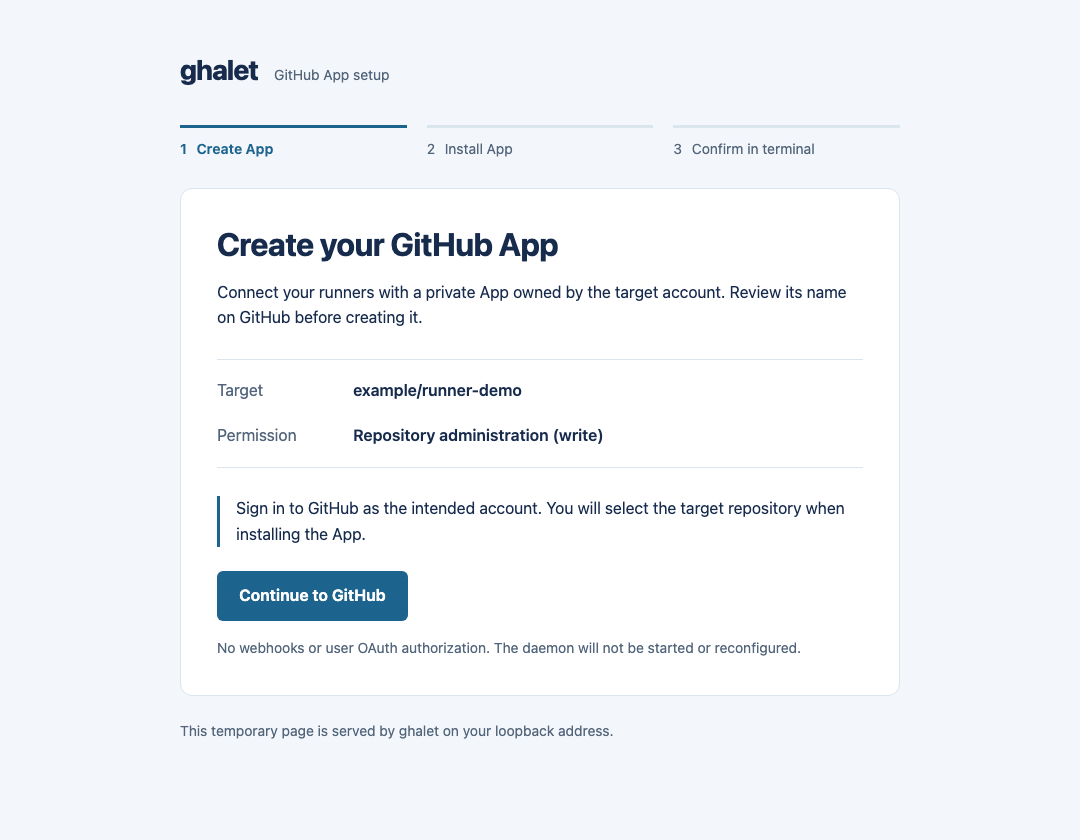
Administration, or organizationSelf-hosted runners. - In the local browser page, choose Continue to GitHub. Sign in as the intended account, review the suggested App name and create the App. Organization policies and your account’s permissions may require an owner.
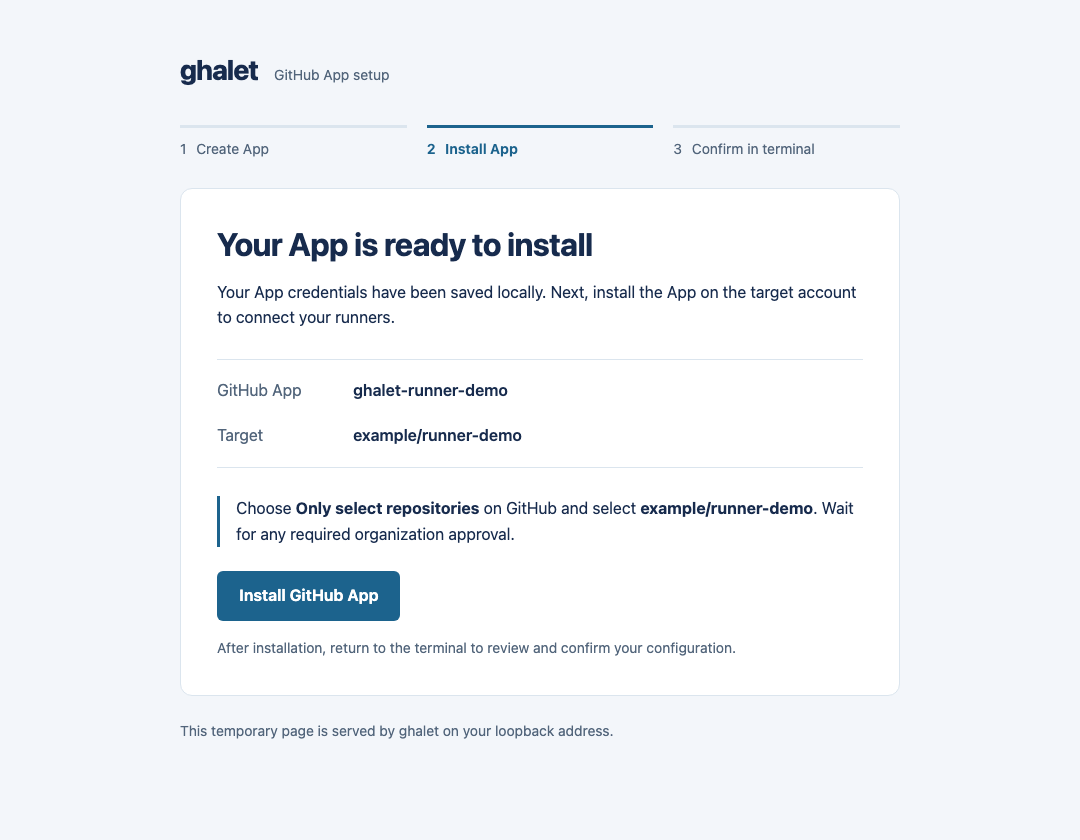
- GitHub redirects to the local callback. The CLI exchanges the one-time code, saves the key and public App metadata, then shows Install GitHub App. Click it to continue in the same browser tab; the installation URL is also printed in the terminal.
- Install on the target account, then return to the terminal. For a repository target, choose Only select repositories and select that repository. Wait for any required approval.
- The CLI discovers the installation, verifies its App, account and required
write permission, then displays the selected credential destination and configuration changes.
Answer
yto save, or decline and resume later.--yesskips only this final configuration confirmation, not GitHub’s approvals.
The browser pages below use example data:
The credential contains type: github-app, clientId, privateKeyFile and
installationId. With --target, the managed entry also contains the scope,
scale set and runner group used to match the static target. With default storage,
any previous managed authentication for the selected target is removed so it
inherits the shared credential.
Only targets present in the static configuration become active. Explicit target
authentication in that configuration takes precedence over the managed entry.
No user OAuth authorization or webhook events are requested; webhook delivery
is disabled. The generated App is private to its owning account.
The temporary loopback server closes after saving the App credentials and
sending the callback page, or on failure. The loaded installation link continues
to work after the server closes. Resuming an existing App prints its installation
URL and opens it unless --no-browser is set.
It checks the callback’s random state and Host and does not expose the key in
browser pages, URLs or command output. Installation discovery uses App JWTs,
not a user token or an installation ID supplied by the browser.
After reviewing the saved configuration:
ghalet config validate
ghalet run
For an existing daemon, use ghalet apply
explicitly instead of starting another one. A successful setup verifies the
installation and its permissions, not live runner/job execution.
SSH and manual browser operation
The browser must reach the CLI’s loopback callback. For an SSH host, forward a fixed port from the browser’s machine:
ssh -L 8765:127.0.0.1:8765 runner-host
# In that SSH session:
ghalet app setup --scope OWNER/REPO --scale-set project \
  --listen 127.0.0.1:8765 --no-browser
Open the printed URLs in your local browser while keeping SSH connected.
--no-browser alone does not make a remote localhost reachable. The listener
accepts only loopback IP addresses, never 0.0.0.0 or a public interface.
For local manual operation, --no-browser works without SSH forwarding.
No public callback or webhook endpoint is needed.
Packaged systemd service
On Linux with root and systemd 250 or later:
sudo ghalet systemd app setup --scope OWNER/REPO --scale-set project
sudo ghalet config validate --config /etc/ghalet/config.yaml
sudo systemctl enable --now ghalet
The default configuration is /etc/ghalet/config.yaml; --config PATH selects
another file but does not change the service unit’s ExecStart or its config path.
When no configuration exists, setup creates it with
runner.user: ghalet-runner and logs.root: /var/log/ghalet/runners for the
package service. Managed information defaults to
/var/lib/ghalet/managed.yaml for /etc/ghalet/config.yaml.
For another config path, explicitly set managedFile or use the service’s
STATE_DIRECTORY consistently. Review the configuration before starting.
Browser URLs are printed by default so the browser need not run as root.
For SSH, use the port forwarding above and add --listen 127.0.0.1:8765
to the systemd command. Open the URLs in the browser on your own machine.
The key is encrypted directly into /etc/ghalet/credentials/KEY.cred, without
writing a plaintext PEM. A dedicated drop-in loads it with
LoadCredentialEncrypted, and the credential’s privateKeyFile points to
/run/credentials/ghalet.service/KEY. Public resume metadata is
/etc/ghalet/credentials/KEY.app.json. KEY is the derived registration key.
Resume decrypts the key only into memory.
Registration reloads unit definitions but never starts or restarts the service.
The encrypted key and resume metadata are saved before service provisioning.
If drop-in creation or unit reload fails, they are retained; fix the reported
problem and rerun the same setup command to retry without creating another App.
An already running service requires a normal stop, successful-shutdown check,
and start to receive updated credentials; apply does not refresh systemd credentials.
See encrypted credentials
for host-key protection, backups
and rotation.
Resume and credential storage
For ordinary setup, the key is stored as <StateDir>/credentials/KEY.pem; KEY.app.json retains
the public App identity, scope and key path so setup can resume. Both files are
0600 under the 0700 credential directory. The JSON does not contain the PEM,
client secret or webhook secret. Protect the PEM and its backups as described
in ordinary credential files
.
Each attempt waits up to 15 minutes. Rerun the same command, configuration, scope, scale set and runner group after interruption, declined confirmation or installation approval. Once metadata is saved, setup reuses that App/key without creating another App or rotating the key. It refuses mismatched scopes, owners, key paths, orphaned existing keys, concurrent setup for the same registration, or concurrent configuration edits. It never automatically deletes a GitHub App.
If App creation completed in GitHub but the callback/exchange failed before local credentials were saved, inspect the App’s settings before starting over. The Manifest exchange must complete within GitHub’s one-hour limit. If a key was saved but metadata could not be written, the error reports the retained key path; use the existing App’s settings and manual credential import rather than blindly creating another App.
Existing target registrations are not duplicated. When the static file needs no
changes, its bytes are left untouched. Updates preserve comments, mapping order,
existing ownership, permissions and final symlinks. New files use 0600.
The managed file must be owned by the current
user and not writable by others. Concurrent managed updates are rejected.
Installation permission checks do not change runner group access policy.
For an existing App key, use
ghalet systemd credential set
instead of creating another App. It updates the managed shared default unless
--no-default is set; explicit target credentials still take precedence.
App private keys do not expire. Installation-token renewal is automatic; exchange the key only when required by policy or suspected compromise. See authentication and rotation . This feature does not establish isolation from jobs running as the same user.